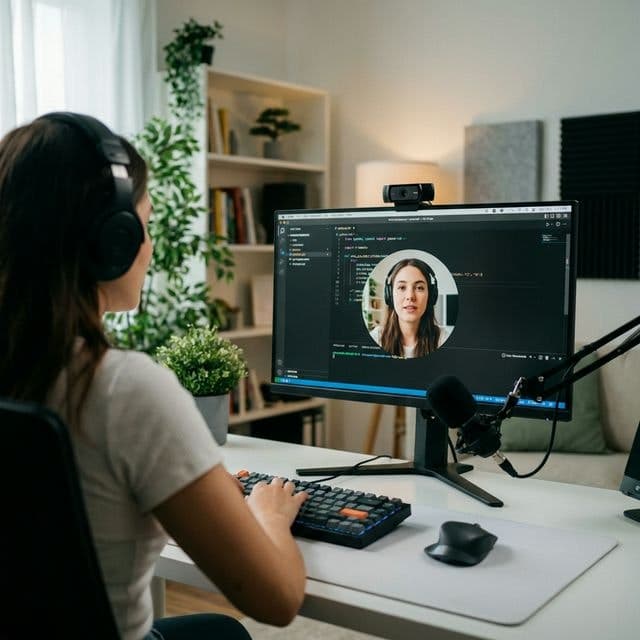
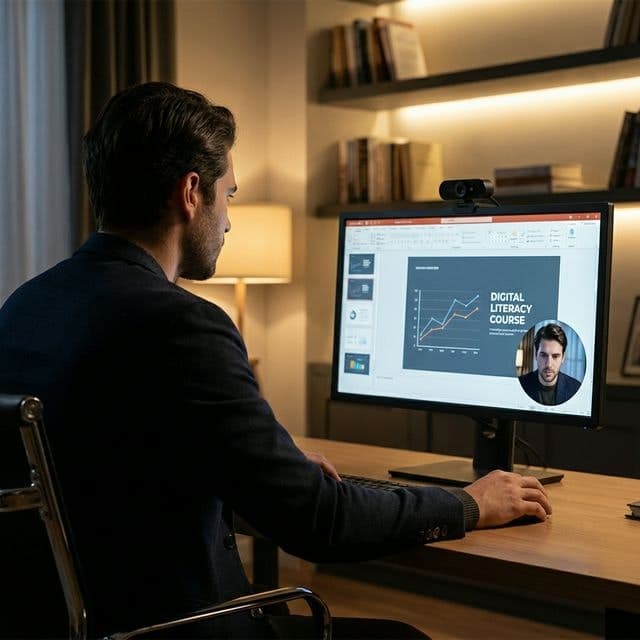
MiniCamApp is a lightweight, always-on-top camera companion for Windows. Perfect for tutorials, streams, and presentations. It features built-in AI for face tracking and background blur without needing a green screen. You can customize the window shape (circle, rounded, square) and transparency. Best of all? It's completely free and portable (Donationware). We'd love your feedback!see more
Founder
Screenshots
About
Imagine creating professional-looking video content, whether you're hosting a crucial presentation, recording an in-depth tutorial, or streaming live to your audience, without the usual hassle of complex software setups. That is exactly what MiniCamApp brings to your Windows desktop. This isn't just another webcam application; it’s a lightweight, always-on-top companion designed to seamlessly integrate your presence into your screen activity. Think about how much smoother your workflow will become when your camera feed stays perfectly positioned, floating above all your other applications, ensuring you maintain eye contact and connection with your viewers no matter what software you are using underneath. It’s built for creators and professionals who value efficiency and a polished appearance without sacrificing system performance. This utility understands that your content is king, and it exists purely to enhance how you deliver it, keeping you visible, engaging, and perfectly framed throughout your session.
What truly sets MiniCamApp apart is the smart technology tucked inside this small package. Forget scrambling to find the right lighting or investing in expensive green screen equipment. We’ve integrated powerful, built-in AI capabilities that handle the heavy lifting for you. This means you get instant, high-quality background blurring, ensuring that whatever chaos might be happening behind you stays completely out of sight, leaving only you as the focus. Furthermore, the AI offers fantastic face tracking, keeping your gaze centered and professional even if you shift slightly in your seat. Beyond the intelligence, customization is key to making this tool truly yours. You have the freedom to choose the perfect frame for your brand or content style, easily switching between classic square, soft rounded edges, or even a clean circular overlay. Adjusting the window transparency is also simple, allowing you to dial in the perfect level of visibility so your camera feed complements, rather than obstructs, the main content on your screen. It’s about giving you granular control over your on-screen persona with zero complexity.
Best of all, this powerful tool is designed to be instantly accessible and completely non-intrusive. MiniCamApp is fully portable, meaning there’s no lengthy installation process to bog down your system; you can run it directly from a USB drive or download it and start using it immediately. We believe that top-tier productivity tools should be available to everyone, which is why we offer MiniCamApp as a free, donationware utility. It’s our way of supporting the community of streamers, educators, and remote workers who rely on clear, professional communication every day. Give it a try today and experience how effortless it can be to elevate your tutorials and streams with a perfectly placed, intelligently managed floating webcam widget that puts your audience connection first.