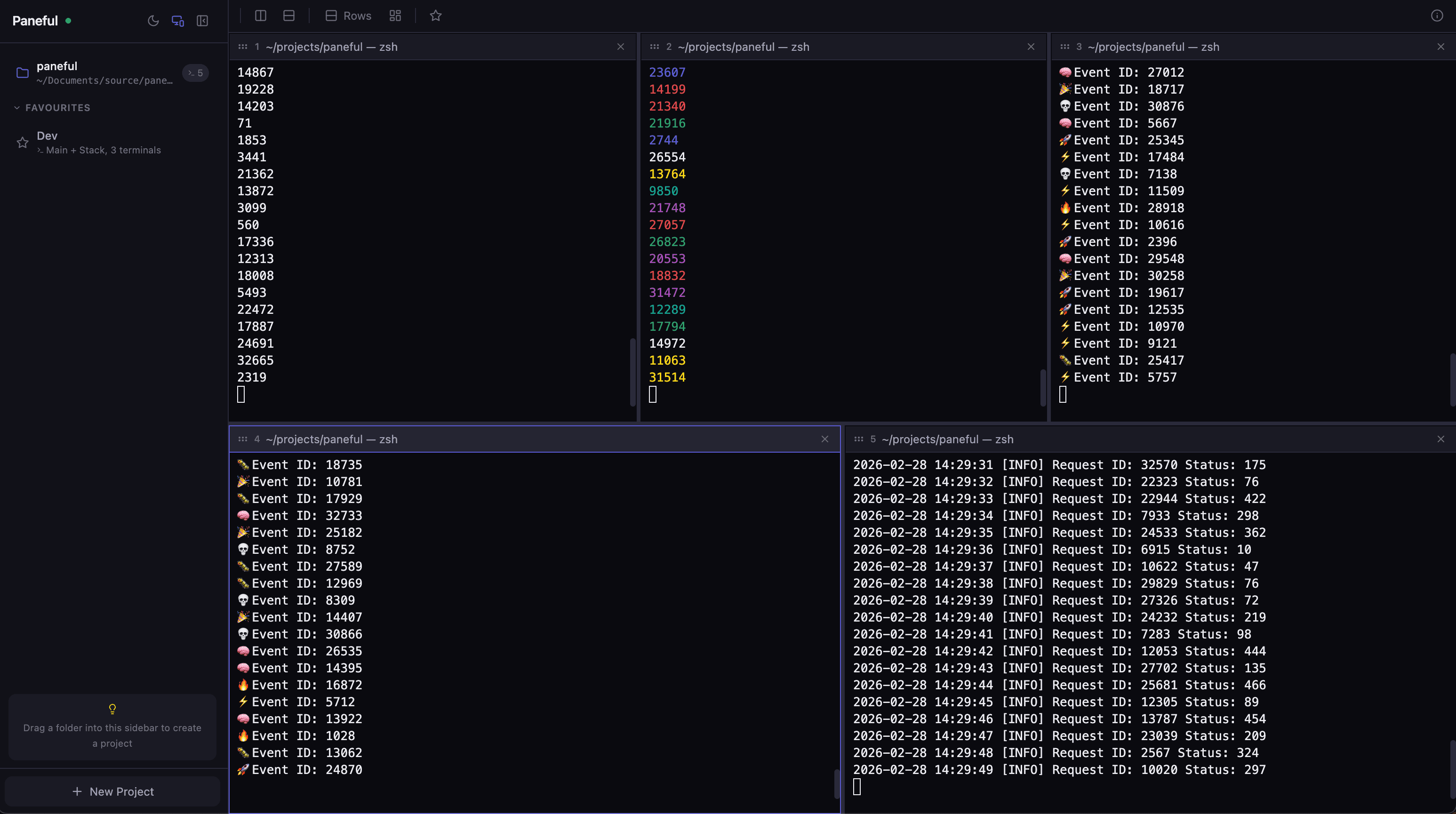
Paneful helps you run multiple projects, worktrees, and agents at once without juggling messy terminal windows. Split panes by project, drag files from Finder, and see at a glance which projects have a dev server running. Save your favourite command setups so your workflow is ready instantly - all in one place, in sync with your editor.see more
Founder
Screenshots
About
Imagine finally conquering the chaos of managing multiple development environments, worktrees, and background processes without ever leaving the flow of your main coding window. That’s the core promise of Paneful. For too long, developers have been forced to juggle countless terminal windows, each running a different service, build process, or agent, leading to context switching fatigue and wasted time trying to remember which pane is doing what. Paneful solves this by deeply integrating your terminal environment directly with your editor. It allows you to organize your entire operational landscape—whether you are managing three separate microservices, testing different branches simultaneously, or running various AI agents—into a single, unified view. You can visually split your workspace so that each pane corresponds logically to a specific project or task. This isn't just about having multiple windows; it's about creating a structured, intelligent command center where everything stays exactly where you expect it to be, instantly accessible and perfectly synchronized with your current focus in the editor.
What truly sets Paneful apart is how it enhances your speed and efficiency. Forget manually typing the same startup commands every morning. Paneful lets you save your most frequently used command setups as instant workflows. Need to spin up a frontend server, a backend API, and a database migration script all at once? Save that configuration, and next time, it’s a single click to bring your entire environment online, ready to go. Furthermore, the visual feedback is invaluable; you can see immediately which projects have active development servers running, eliminating the guesswork. Even integrating external assets becomes seamless, allowing you to simply drag files directly from your file explorer, like Finder, into the correct active pane where you need to execute a command or transfer data. This level of integration turns a collection of disparate command lines into a cohesive, intelligent workstation designed around your actual development rhythm.
This tool is fundamentally about reclaiming mental bandwidth. By centralizing, organizing, and automating the repetitive setup tasks associated with complex, multi-project workflows, Paneful lets you dedicate your full cognitive energy to solving actual coding problems rather than managing infrastructure. It’s the productivity layer that sits between your brain and the command line, ensuring that every project, every worktree, and every background agent is visible, manageable, and instantly recallable. If your daily routine involves constantly switching context between different terminal sessions for different tasks, Paneful isn't just a nice addition—it’s the essential upgrade that transforms terminal management from a necessary chore into a streamlined, powerful part of your development process.